


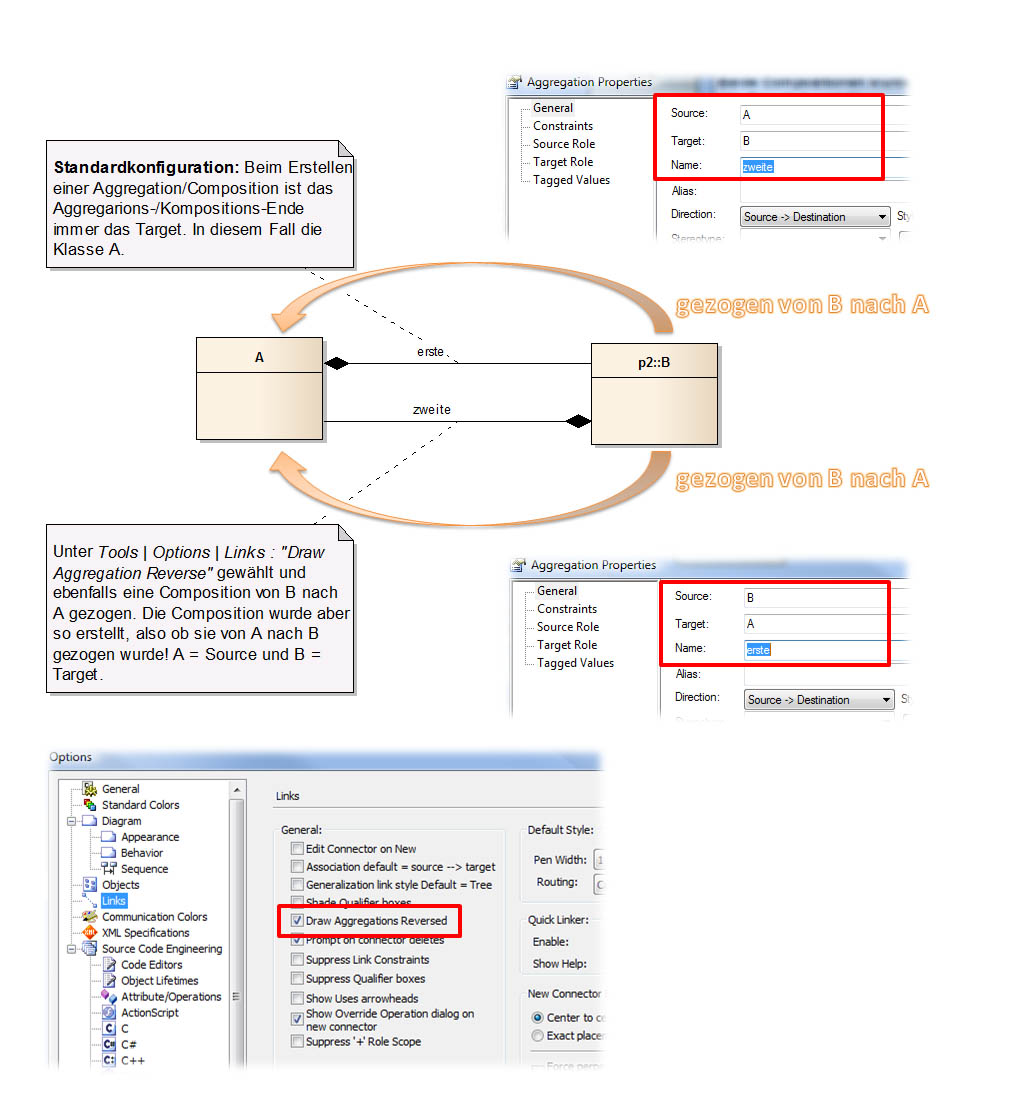
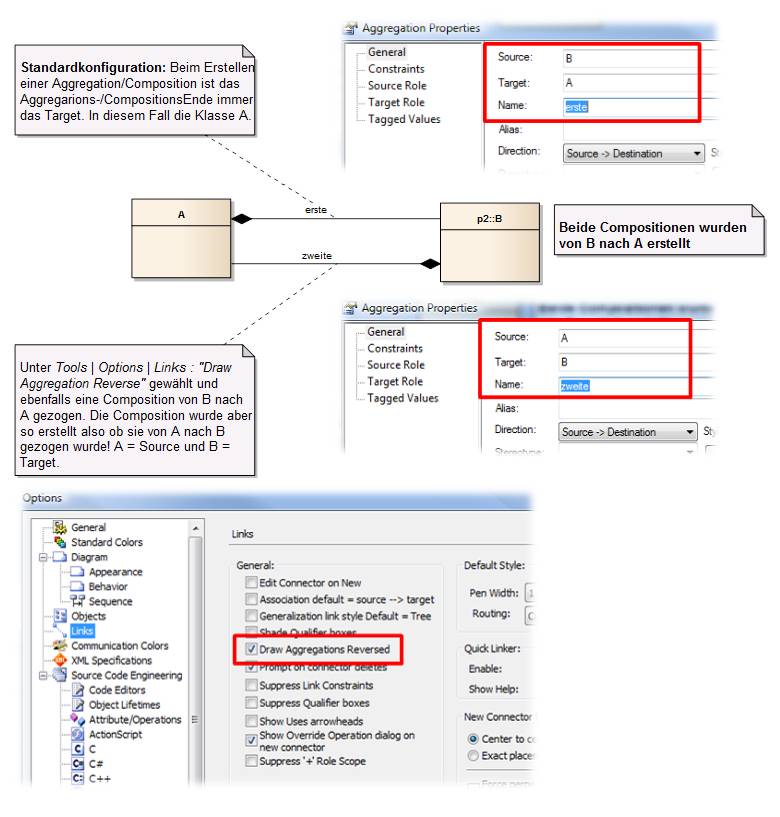
In Enterprise Architect werden Compositions und Aggregations standardmäßig vom Teil zum Ganzen gezogen, d. h., das Ende mit der Raute ist immer am Target und nicht am Source! Wer gerne andersherum modellieren will, kann dies mit einer kleinen Konfiguration unter Tools | Options | Links : Draw Aggregations Reversed erreichen (siehe Grafik). Nun kann die Aggregation und Composition gezeichnet werden und die Raute erscheint an dem Element, von dem die Relation gezeichnet wurde. Doch genauer betrachtet liegt die Raute immer noch am Target und nicht am Source!

Repeating myself: this is one of the most annoying behaviors of EA. It does not change the way how EA represents the Aggregations. And this is really a problem:
1. the relationship view shows associations and aggregations not in the same direction. By this relationship view is really useless to to investigate the model, in particular the structural features of a class.
it is possible to overcome this manually, but this leads to the next issue:
2. Ea stores the aggreation such that the aggregation is stored in the same package as the composite end. This causes serious problems when transferring models from one project to another.
really messy! And Sparx service dos not provide a helpful solution.
This behavior of EA for aggregations and compositions is abolutely unbelievable. I have never seen such a confusing interpretation of drawing of such elements with UML or model based engineering in general.
Please EA guys, change it!
Well, at least one end must be the aggregate and the other end is the part. In EA the source connector end points always to the part. However, what would be the difference if the source end points to the aggregate?
I can reproduce the problem that Bernhard W. mentioned. By the way, drop us a mail at support @ sparxsystems . eu with an example and we will discuss it with the development team.
Such behavior of EA is perverse. It’s against the common sense.
Example: I want to create relation „User has a Role“. I click on the User class and draw a relation line to the Role class. The diamond appears at the target (Role class), not at the source (User class).
Common sense: „User has a Role“.
EA logic: „Role is own by a User“. Basically the same effect. It’s not a mistake. But it MUCH MUCH harder to understand and to use.
Common sense: „I need a ticket from Berlin to London“.
EA logic: „I need a ticket to London from Berlin“. This is how aggregation/composition relation is drawn in editor.
Why EA forces users to use such weird logic???
It is good that you attempted to make it configurable. But it does not work.
Tools -> Options -> Links
„Association default = source –> target“ does not have any effect at all. Source is where the line starts, Target is where it ends. Always. No matter if this option is checked or not. Is it a bug in EA?
„Draw aggregations reversed“: when checked, relation are drawn as I expect, diamond is at the beginning of the line. But the source is wrong. EA shows, that the source is where the line ends, target is where the line starts.
Examples:
– If this option unchecked (default): I draw a line from User to Role. Result: Source is where the line starts (correct), target is where the line ends (correct), but the Diamond is at the line end, which is weird and not what I expect.
– If this option checked: I draw a line from User to Role. Result: The diamond is at the line start (correct), but now EA shows, that Source is where the line ends and Target is where the line starts. This is weird.
This does not depend on „Association default = source –> target“.
… some connectors in EA have always a predefined source and target.
That means, Composition and Aggregation always have their SOURCE at the part-end and the TARGET at its whole-end (diamond head). This is a rule in EA and allows to programmatically (or with SQL, etc.) figure out which is the composite end (points to the whole) and which is the part-end.
The configuration shown has no effect on the source and target of the link. It helps only when you create the desired direction of the arrow.
Agree. it is illogical and confusing, which means to waste time when manipulating. BTW I love some of the adjectives used „messy“, „unbelievable“, „against common sense“ and best „perverse“; really it seems designed evilly to harm the user! 😛
On top, the idea of SOURCE is the part, whereas the TARGET is the whole is against part-whole semantics and modularity. It means that a part knows who owns / references it. A wheel knows to what car belongs, or in the example said a role knows which user uses/owns it.
IMO the problem is not that „… some connectors in EA have always a PREDEFINED source and target“. is that have a ONE AND ONLY FIXED source and target. Is not PRE-defined (which implicitly would mean that can be changed), it seems defined for ever.
Also the last replay:
„This is a rule in EA and allows to programmatically (or with SQL, etc.) figure out which is the composite end (points to the whole) and which is the part-end.“
It’s terrifying and not uncommon: provide a feature based on the technical reasons instead of -and against- the user needs.
So my question is, is this going to be changed?
Kind Regards,
Luis
nothing is written in stone 😉
As already mentioned, many 3rd party extensions are based on this „rule“.